
Google Ads for Beginners Online advertising has become one of the most effective ways for businesses to reach potential customers. Among all digital advertising platforms, Google Ads stands out as one of the most powerful tools for driving traffic, generating leads, and increasing sales.
If you’re new to online advertising, this Google Ads for Beginners guide will help you understand how Google Ads works, how to create campaigns, and how to maximize your return on investment (ROI).
What Is Google Ads?
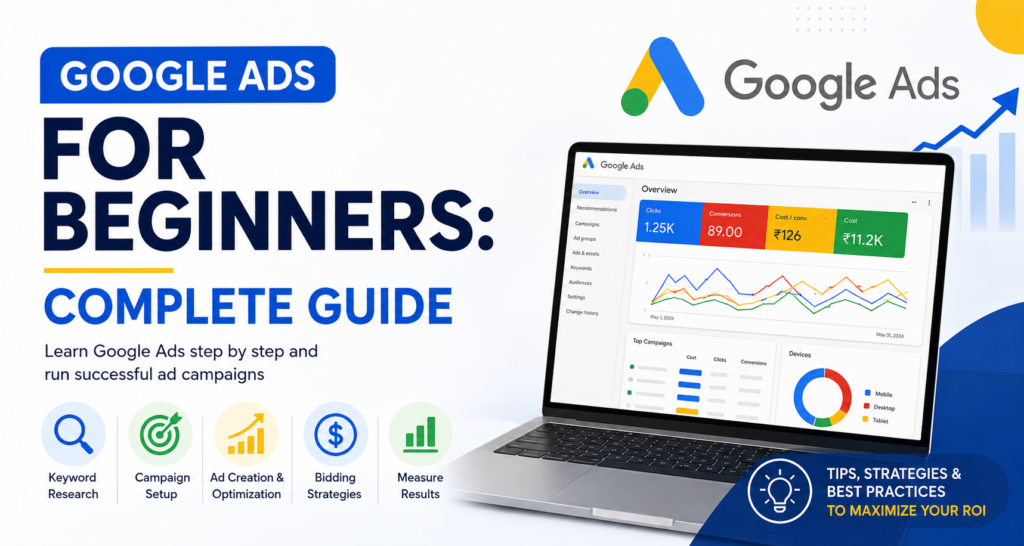
Google Ads is Google’s online advertising platform that allows businesses to display ads on Google Search, YouTube, Gmail, Google Maps, and millions of websites across the Google Display Network.
Businesses only pay when users interact with their ads, making it a cost-effective advertising solution.
Benefits of Google Ads
- Instant visibility on Google search results
- Target potential customers actively searching for your services
- Flexible budgets for businesses of all sizes
- Measurable results and detailed reporting
- High-quality lead generation
- Increased brand awareness
How Google Ads Works
Google Ads operates on a bidding system.
When someone searches for a keyword related to your business, Google evaluates:
- Your bid amount
- Ad quality
- Landing page experience
- Expected click-through rate (CTR)
The best combination wins the ad placement.
Example
If you own a digital marketing agency and bid on:
“digital marketing services”
Your ad may appear above the organic search results when users search for that keyword.
Types of Google Ads Campaigns
H2: Search Campaigns
Search ads appear at the top of Google search results.
Best for:
- Lead generation
- Service-based businesses
- Local businesses
Example:
- SEO Services
- Web Design Services
- Digital Marketing Agency
H2: Display Campaigns
Display ads are image-based advertisements shown on websites within Google’s network.
Best for:
- Brand awareness
- Retargeting campaigns
- Product promotion
H2: Video Campaigns
Video ads appear on YouTube.
Best for:
- Brand visibility
- Product demonstrations
- Customer education
H2: Shopping Campaigns
Shopping ads display products directly in search results.
Best for:
- E-commerce businesses
- Online retailers
H2: Performance Max Campaigns
Performance Max campaigns use AI to show ads across all Google channels.
Best for:
- Maximizing conversions
- Businesses seeking automation
How to Create a Google Ads Account
Step 1: Create an Account
Visit Google Ads and sign up using your Google account.
Step 2: Define Your Goal
Choose your objective:
- Website Traffic
- Leads
- Sales
- Brand Awareness
- App Promotion
Step 3: Select Campaign Type
Choose:
- Search
- Display
- Video
- Shopping
- Performance Max
Step 4: Set Budget
Decide how much you want to spend daily.
Example:
- ₹300/day
- ₹500/day
- ₹1000/day
Start small and scale based on performance.
Google Ads Keyword Research for Beginners
Keyword research is the foundation of every successful campaign.
H2: Why Keywords Matter in Google Ads for Beginners
Keywords determine when your ads appear.
Good keyword examples:
- digital marketing agency
- seo services
- local seo company
- lead generation services
Avoid broad keywords that may waste your budget.
H3: Use Long-Tail Keywords and google ads
Long-tail keywords often have:
- Lower competition
- Lower CPC
- Higher conversion rates
Examples:
- best digital marketing agency for small business
- affordable SEO services near me
- Google Ads management company
Understanding Keyword Match Types
Broad Match
Maximum reach but less control.
Example:
- digital marketing
Phrase Match
Shows ads for searches that include your keyword phrase.
Example:
- “digital marketing agency”
Exact Match
Shows ads for highly relevant searches.
Example

The latest tips and news straight to your inbox!
This usually provides the highest-quality traffic.
Writing High-Converting Google Ads
Your ad should include:
Headline
Include the focus keyword.
Example:
- Best Digital Marketing Agency
- Professional SEO Services
- Affordable Google Ads Management
Description
Highlight benefits.
Example:
“Generate more leads with our expert digital marketing services. Get a free consultation today.”
Call-to-Action
Use strong CTAs:
- Get Started
- Contact Us Today
- Request a Free Quote
- Book a Consultation
Creating Effective Landing Pages
A great ad needs a great landing page.
Landing Page Best Practices
- Fast loading speed
- Mobile-friendly design
- Clear headline
- Strong CTA button
- Customer testimonials
- Contact form
A poor landing page can increase costs and reduce conversions.
Google Ads Bidding Strategies
Manual CPC
You control bids manually.
Best for:
- Beginners wanting more control
Maximize Clicks
Google automatically gets the most clicks within your budget.
Best for:
- Traffic campaigns
Maximize Conversions
Google focuses on generating conversions.
Best for:
- Lead generation
- Sales campaigns
Target CPA
Google aims to achieve conversions at your desired cost.
Best for:
- Mature campaigns
Common Google Ads Mistakes Beginners Make
H2: Google Ads for Beginners Mistakes to Avoid
1. Choosing Broad Keywords
This often results in irrelevant clicks.
2. Ignoring Negative Keywords
Negative keywords prevent unwanted traffic.
Example:
If you sell services, add:
- free
- jobs
- training
The latest tips and news straight to your inbox!
3. Sending Traffic to the Homepage
Use dedicated landing pages instead.
4. Not Tracking Conversions
Without tracking, you cannot measure success.
5. Poor Ad Copy
Weak headlines reduce click-through rates.
How to Measure Google Ads Success
Monitor:
- Clicks
- Impressions
- CTR
- CPC
- Conversion Rate
- Cost Per Lead
- Return on Ad Spend (ROAS)
Focus on conversions, not just traffic.
Google Ads for Beginners: Best Practices
H2: Google Ads for Beginners Best Practices
- Start with Search campaigns
- Use long-tail keywords
- Add negative keywords
- Test multiple ad variations
- Optimize landing pages
- Track conversions
- Review performance weekly
- Scale winning campaigns gradually
Conclusion
Google Ads is one of the fastest ways to attract qualified traffic, generate leads, and grow your business online. While the platform may seem complex at first, understanding keywords, ad creation, bidding strategies, and conversion tracking can help beginners achieve excellent results.
By following this Google Ads for Beginners guide, you can build effective campaigns, avoid common mistakes, and maximize your advertising budget. Whether you’re a small business owner, marketer, or entrepreneur, Google Ads can become a powerful tool for business growth when used correctly.
- Complete Google Ads Course For Beginners | 2026 Edition
- Ads Basics: A Complete Beginner Blueprint
- Read the Full Google Ads Tutorial
- Start Using Google Ads To Drive Sales and Sustain Performance!
- How to set up your first Google Ads campaign
- Learn More About Google Ads
What Is Google Ads & How Does It Work? A Comprehensive Guide